Clone the Template.
Launch Your Own Cast.
Fork MikeCast, rename it, point it at your topics — and you have a fully automated daily podcast + email briefing + static website, deployed free on GitHub Pages in under 30 minutes.
What You'll Build
MikeCast is a fully-automated pipeline that runs every weekday morning, pulling from a dozen news sources, scoring articles with GPT-4o, generating a polished email briefing and a conversational podcast episode — then delivering everything automatically with zero manual intervention.
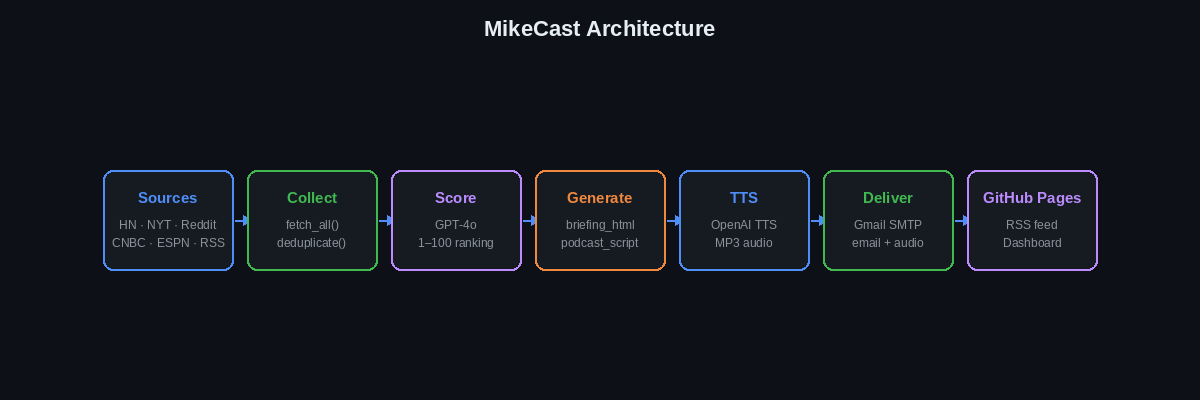
End-to-end architecture — from raw RSS feeds to your podcast app
Email Newsletter
Styled HTML briefing with top 25 stories, sent via Gmail SMTP
Podcast Episode
5-minute MP3 generated by OpenAI TTS, conversational tone
Web Dashboard
Browsable archive of all briefings hosted on GitHub Pages
RSS Feed
iTunes-compatible feed.xml — subscribe in any podcast app
Once you've cloned the repo, use Claude Code to orient yourself before making any changes:
>Read mikecast_briefing.py and give me a plain-English summary of the full pipeline — from fetching news to sending email — in under 10 bullet points. Note any configuration constants I might want to change.
Make It Your Own
MikeCast is a template. Fork it once and it becomes your podcast — your name, your topics, your voice. The same GitHub Actions pipeline runs on your repo, the same GitHub Pages CDN hosts your site. You own it end to end.
What GitHub Pages hosts for you
When you push to main, GitHub Pages automatically serves your entire
repo as a public static website — no server, no build step, no config beyond flipping
one toggle in Settings. Everything the daily script generates lands at a permanent
public URL:
| File in repo | Public URL on GitHub Pages | What it is |
|---|---|---|
index.html |
https://you.github.io/yourcast/ | Your podcast dashboard — browsable episode archive |
data/feed.xml |
https://you.github.io/yourcast/data/feed.xml | RSS feed — paste into Apple Podcasts & Spotify |
data/audio/episode_YYYYMMDD.mp3 |
https://you.github.io/yourcast/data/audio/… | Episode audio — linked from the feed automatically |
data/cover.png |
https://you.github.io/yourcast/data/cover.png | Podcast cover art — referenced in the RSS feed |
5-step quickstart
Fork the template
Click "Use this template" on GitHub — creates your own copy at github.com/YOU/yourcast
Rename the show
Replace "MikeCast" with your show name throughout the codebase (one Claude Code prompt)
Set your Pages URL
Update SITE_BASE_URL so audio links in the feed point to your GitHub Pages domain
Add your secrets
5 env vars in Settings → Secrets → Actions (API keys + Gmail)
Enable Pages
Settings → Pages → Deploy from branch → main / root → Save. Done.
Do it with Claude Code
Steps 2 and 3 touch a dozen files — let Claude Code do the work:
>Rename this podcast from "MikeCast" to "TechCast" (swap in your chosen name) throughout the entire codebase — all strings and variable names in mikecast_briefing.py, the GitHub Actions workflow YAML, index.html page title and headings, and the RSS channel metadata strings inside generate_rss_feed(). Also rename the file mikecast_briefing.py to techcast_briefing.py and update the workflow run: step to call the new filename. Show me every file you changed.
>Update SITE_BASE_URL in the script to https://YOUR-USERNAME.github.io/YOUR-REPO-NAME/ — this is the base URL GitHub Pages uses to serve your repo. Find every place this value flows into the RSS feed (audio enclosure URLs, cover art href, feed self-link) and confirm they will all be correct after this change.
>Update the podcast identity fields inside generate_rss_feed(): set the RSS channel title, description, link, itunes:author, managingEditor, and itunes:owner/itunes:email to my information. Also update the itunes:category to match my content (e.g. "Technology", "Business", "News"). Show me all the lines you changed.
Prerequisites
Everything listed below is free or has a generous free tier. You only need your local machine for the initial setup step — after that, everything runs in the cloud.
| Requirement | Purpose | Cost |
|---|---|---|
| GitHub account | Repo hosting, Actions runner, Pages hosting | Free |
| OpenAI account + API key | GPT-4o (scoring & writing) + TTS (audio) | ~$1–3 / month |
| NYT Developer account + API key | New York Times news articles | Free tier |
| Gmail account + App Password | SMTP delivery of email briefings | Free |
| Python 3.11+ (local) | Initial setup and testing only | Free |
| Claude Code CLI | Generating assets, customizing code, debugging | Free with Claude subscription |
Verify your local environment is ready before continuing:
>Check whether Python 3.11 or higher and pip are installed on this machine. Show the versions. Then verify these packages are importable: feedparser, openai, requests, beautifulsoup4. For any that are missing, show the exact pip install command to fix it.
Choose Your Topics & Sources
MikeCast organizes content into categories. Each category pulls from one or more sources. GPT-4o scores every article 1–100 for relevance, so you don't need to curate manually — just pick categories that match your interests and the scoring layer handles the rest.
Pick 3–5 categories to keep your briefing focused and your OpenAI costs low.
Built-in Free Sources (no API key required)
| Source | Category | Endpoint Type |
|---|---|---|
| Hacker News (Algolia) | AI & Tech | JSON API |
| TechCrunch | AI & Tech | RSS |
| Ars Technica | AI & Tech | RSS |
| Reddit r/technology | AI & Tech | RSS |
| CNBC Top News | Business & Markets | RSS |
| Reuters Business | Business & Markets | RSS |
| ESPN NY Giants / Yankees | NY Sports | RSS |
API-Key Sources
| Source | Category | Sign-up URL |
|---|---|---|
| New York Times | All categories | developer.nytimes.com |
| OpenAI (GPT-4o + TTS) | Scoring & generation | platform.openai.com |
Customizing your topics with Claude Code
Adding a new category is a one-prompt job. The script follows a consistent pattern — Claude Code can read it and match that pattern exactly:
>Add a "World News" category to mikecast_briefing.py that pulls from BBC News RSS (https://feeds.bbci.co.uk/news/world/rss.xml) and Reuters World News (https://feeds.reuters.com/reuters/worldNews). Follow the exact same pattern as the existing entries in the CATEGORIES dict.
To bias the scoring toward companies or topics you care about most:
>Update the GPT-4o scoring prompt in score_and_rank_articles() so that articles mentioning OpenAI, Anthropic, Google DeepMind, or NVIDIA receive a +15 point scoring bonus. Keep all other scoring logic the same and don't change the 1–100 scale.
Set Up the Repository
Fork the MikeCast template on GitHub (or clone it locally to customize before pushing).
The repo is structured so that data/ is the only directory the Actions
workflow writes to — everything else is source code.
1. Fork or clone
# Option A: clone and push to your own new repo
git clone https://github.com/schwim23/mikecast-starter.git
cd mikecast

# Option B: use GitHub's template feature
# → github.com/schwim23/mikecast-starter → "Use this template" button
2. Repository structure
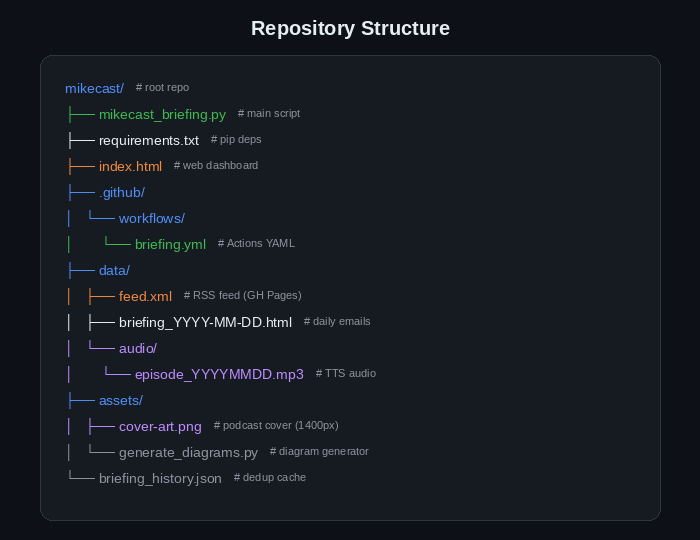
Key files and directories in the MikeCast repo
The data/ directory is created automatically the first time the script runs
(DATA_DIR.mkdir(exist_ok=True) runs at module load). You don't need to
create it manually.
Let Claude Code generate the supporting files so you don't have to write them from scratch:
>Create a .gitignore for this Python project. Exclude: .env, __pycache__/, *.pyc, .DS_Store, .venv/, *.egg-info/, and data/audio/*.mp3 (audio files are large; they're committed by the Actions workflow, not locally).
>Read mikecast_briefing.py and generate an accurate requirements.txt by inspecting all import statements. Include only third-party packages (not Python stdlib). Pin each package to a recent stable version.
data/feed.xml file will be publicly
accessible at https://YOUR-USERNAME.github.io/REPO-NAME/data/feed.xml once
you enable GitHub Pages in Section 9.
Configure API Keys (GitHub Secrets)
Never commit API keys to your repository. GitHub Secrets encrypts them and injects them as environment variables at runtime — your keys are never visible in logs.
How to add a secret
- Go to your repo on GitHub → click Settings (top nav)
- In the left sidebar, click Secrets and variables → Actions
- Click New repository secret
- Enter the secret name (exactly as shown in the table below) and paste the value
- Click Add secret — repeat for each secret
Required secrets
| Secret Name | What to paste | Where to get it |
|---|---|---|
NYTAPIKEY |
Your NYT API key | developer.nytimes.com/get-started |
OPENAI_API_KEY |
Your OpenAI secret key (sk-…) |
platform.openai.com/api-keys |
GMAIL_APP_PASSWORD |
16-character Gmail App Password | Google Account → Security → App passwords |
GMAIL_FROM |
Your full Gmail address | e.g. yourname@gmail.com |
GMAIL_TO |
Recipient address(es) | Can be same as GMAIL_FROM; comma-separate multiple |
Add startup validation so the script fails immediately with a clear message if any secret is missing, rather than crashing mid-run:
>Add a validate_env() function to mikecast_briefing.py that checks all 5 required environment variables are set: NYTAPIKEY, OPENAI_API_KEY, GMAIL_APP_PASSWORD, GMAIL_FROM, GMAIL_TO. If any are missing, raise a clear ValueError that lists each missing variable name and a one-line hint on where to get it. Call validate_env() at the top of main() before anything else runs.
Understand the Python Script
mikecast_briefing.py is a single-file script that orchestrates
the entire pipeline. Here's what each major function does:
| Function | What it does |
|---|---|
collect_all_news() |
Fetches raw articles from all configured sources (RSS, JSON APIs, NYT API) |
deduplicate() |
Loads briefing_history.json and removes stories seen in the last 7 days |
score_and_rank_articles() |
Sends each article title + summary to GPT-4o; receives a 1–100 relevance score |
select_top_articles() |
Picks the best 25 articles across all categories using the scores |
generate_briefing() |
GPT-4o writes a fully-styled HTML email newsletter from the top articles |
generate_podcast_script() |
GPT-4o writes a 5-minute conversational podcast script covering the top stories |
generate_audio() |
Sends the podcast script to OpenAI TTS; saves MP3 to data/audio/ |
send_email() |
Attaches the MP3, embeds the HTML body, and sends via Gmail SMTP |
update_rss_feed() |
Appends the new episode (with iTunes tags) to data/feed.xml |
Customizing the script
All the key configuration lives at the top of the file. Use these prompts to make common customizations without needing to read through the full script:
>In mikecast_briefing.py, change the TTS voice from "onyx" to "nova" and increase PODCAST_MAX_WORDS to 900. Show me the lines you changed.
>Add the MIT Technology Review RSS feed (https://www.technologyreview.com/feed/) as a source to the "AI & Tech" category in mikecast_briefing.py. Follow the same dict format as the existing sources in that category.
>Rewrite the system prompt inside generate_podcast_script() so the output sounds like an upbeat morning radio host — energetic and conversational — rather than a formal news anchor. Keep the same structure (intro, top stories, sign-off) but change the tone instructions in the prompt string.
>Add a one-line timestamped status print before and after each major function call in main(): collecting news, deduplicating, scoring, generating briefing, generating podcast script, TTS, sending email, updating RSS. Format: "[HH:MM:SS] Starting: <step>" and "[HH:MM:SS] Done: <step> (Xs)". Don't log any API keys or passwords.
# ── Configuration ─────────────────────────────────────────
PODCAST_VOICE     = "onyx"         # OpenAI TTS voice
PODCAST_MAX_WORDS = 750            # ~5 min at normal speech pace
TOP_ARTICLES      = 25             # stories per briefing
DEDUP_DAYS        = 7              # skip stories seen recently
SCORE_MODEL       = "gpt-4o"       # model for scoring
WRITE_MODEL       = "gpt-4o"       # model for writing

CATEGORIES = {
    "AI & Tech": [
        {"type": "rss",  "url": "https://hnrss.org/frontpage"},
        {"type": "rss",  "url": "https://techcrunch.com/feed/"},
        {"type": "rss",  "url": "https://feeds.arstechnica.com/arstechnica/index"},
    ],
    "Business & Markets": [
        {"type": "rss",  "url": "https://www.cnbc.com/id/100003114/device/rss/rss.html"},
    ],
    "NY Sports": [
        {"type": "rss",  "url": "https://www.espn.com/espn/rss/nfl/news"},
    ],
}Generate Assets with Claude Code
Your podcast needs a cover image — Apple Podcasts requires at least 1400×1400 px. Rather than using design software, generate it programmatically with Python's Pillow library. This keeps everything version-controlled and reproducible.
>Write a Python PIL script that generates a 1400x1400 podcast cover image. Requirements: dark navy background #0d1117, a solid blue bar (#4f8ef7) across the top 100px, bold white text "MikeCast" centered at y=700 in the largest available system font, muted gray text "#8b949e" reading "Daily AI News Briefing" centered at y=870 in a smaller size. Try LiberationSans-Bold first, fall back to DejaVuSans-Bold. Save to assets/cover-art.png.
>Run assets/generate_cover.py and verify the output file was created at assets/cover-art.png. Then use PIL to open it and confirm its size is exactly 1400x1400 pixels. Print the result.
>Write a PIL script that generates three badge PNG images at 180x54px each: one for Apple Podcasts (dark #1c1c1e background, white text "Listen on Apple Podcasts"), one for Spotify (#1DB954 green background, white text "Listen on Spotify"), and one RSS badge (#f97316 orange, white text "Subscribe via RSS"). Save them to data/badge-apple.png, data/badge-spotify.png, and data/badge-rss.png.
The PIL approach
Here's the pattern every asset script in this project follows — useful context if you want to write your own:
from PIL import Image, ImageDraw, ImageFont
import os

W, H = 1400, 1400
img = Image.new("RGB", (W, H), (13, 17, 23))   # #0d1117
draw = ImageDraw.Draw(img)

# Blue accent bar at top
draw.rectangle([0, 0, W, 100], fill=(79, 142, 247))

font_lg = ImageFont.truetype("/usr/share/fonts/truetype/liberation/LiberationSans-Bold.ttf", 130)
font_sm = ImageFont.truetype("/usr/share/fonts/truetype/liberation/LiberationSans-Regular.ttf", 62)

draw.text((W//2, 700), "MikeCast", fill=(230, 237, 243), font=font_lg, anchor="mm")
draw.text((W//2, 870), "Daily AI News Briefing", fill=(139, 148, 158), font=font_sm, anchor="mm")

img.save("assets/cover-art.png")GitHub Actions Workflow
The .github/workflows/briefing.yml file tells GitHub to run your script
automatically every weekday morning. It also commits the generated files (audio, HTML,
feed.xml) back to the repo so they're served by GitHub Pages.
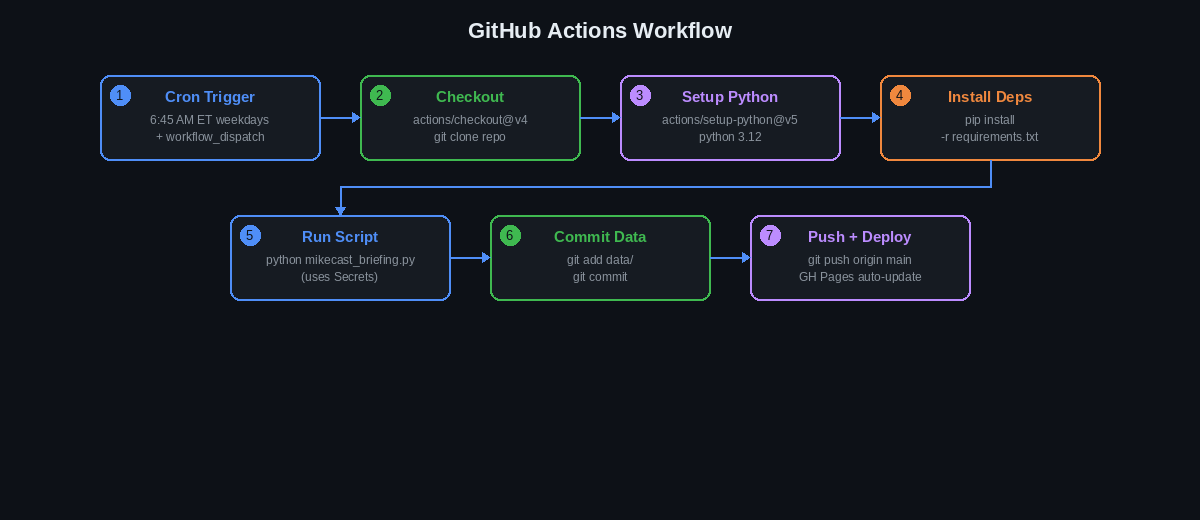
The 7-step Actions pipeline that runs every weekday at 6:45 AM ET
Full workflow file
name: Daily MikeCast Briefing

on:
  schedule:
    - cron: '45 11 * * 1-5'   # 6:45 AM ET on weekdays (UTC-5 in winter)
  workflow_dispatch:          # also allows manual trigger from Actions tab

jobs:
  briefing:
    runs-on: ubuntu-latest
    permissions:
      contents: write           # required so the job can git push

    steps:
      - uses: actions/checkout@v4

      - uses: actions/setup-python@v5
        with:
          python-version: '3.12'

      - run: pip install -r requirements.txt

      - name: Generate briefing
        env:
          NYTAPIKEY: ${{ secrets.NYTAPIKEY }}
          OPENAI_API_KEY: ${{ secrets.OPENAI_API_KEY }}
          GMAIL_APP_PASSWORD: ${{ secrets.GMAIL_APP_PASSWORD }}
          GMAIL_FROM: ${{ secrets.GMAIL_FROM }}
          GMAIL_TO: ${{ secrets.GMAIL_TO }}
        run: python mikecast_briefing.py

      - name: Commit & push data
        run: |
          git config user.name "MikeCast Bot"
          git config user.email "actions@github.com"
          git add data/ briefing_history.json
          git diff --staged --quiet || \
            git commit -m "briefing $(date +%Y-%m-%d)"
          git push
Key notes
-
UTC offset: GitHub Actions cron uses UTC. In winter (EST = UTC-5),
11:45 UTC=6:45 AM ET. In summer (EDT = UTC-4), change to10:45 UTCfor the same local time. -
workflow_dispatch: Lets you trigger the workflow manually from the Actions tab — useful for testing or backfilling a missed day. -
permissions: contents: write: Without this, the job cannot push commits back to the repo. - Free tier limits: GitHub Actions gives 2,000 minutes/month on free accounts. Each MikeCast run takes ~2–3 minutes, so ~20 weekday runs/month ≈ 50 minutes — well within the free limit.
Before your first real run, have Claude Code audit the workflow file for common mistakes:
>Read .github/workflows/briefing.yml and check for these common issues: (1) is "permissions: contents: write" set at the job level? (2) does the cron expression match the intended local time accounting for UTC offset? (3) is actions/checkout@v4 used? (4) does the commit step handle the case where there's nothing new to commit (empty diff)? Report any problems and suggest fixes.
>My GitHub Actions workflow fails on the git push step with "remote: Permission to USER/REPO.git denied to github-actions[bot]". Read .github/workflows/briefing.yml and identify the cause. The fix is almost always a missing permissions block — show me exactly where to add it.
Host the RSS Feed on GitHub Pages
GitHub Pages turns your repo into a full static website — no separate hosting, no
build pipeline, no cost. Everything your daily script commits to main
is instantly live at your public URL. That includes the podcast dashboard, the RSS
feed, the audio files, and the cover art.
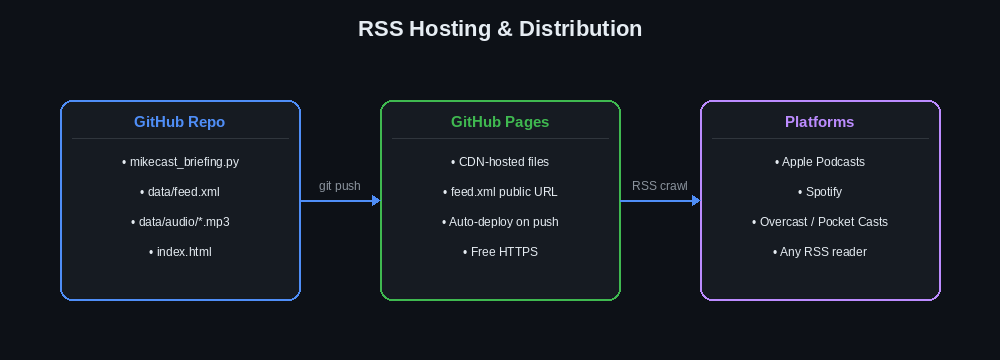
One push to main → your entire site updates automatically
Your complete static site
After enabling Pages, every file in your repo has a permanent public URL. Here's what each one does:
| Repo file | Public URL | Used by |
|---|---|---|
index.html |
https://you.github.io/yourcast/ | Browsers — your podcast website and episode archive |
data/feed.xml |
https://you.github.io/yourcast/data/feed.xml | Apple Podcasts, Spotify, any RSS app |
data/audio/episode_YYYYMMDD.mp3 |
https://you.github.io/yourcast/data/audio/… | Podcast apps (linked from feed enclosure tags) |
data/cover.png |
https://you.github.io/yourcast/data/cover.png | Apple Podcasts (itunes:image href in the feed) |
data/ and pushes. GitHub Pages picks up the push within ~60 seconds and
the CDN updates. Podcast apps check the feed on their own schedule (Apple Podcasts
checks roughly every hour). No manual deploy step — ever.
Enable GitHub Pages
- Go to your repo → Settings → Pages (left sidebar)
- Under Source, select Deploy from a branch
- Branch: main, Folder: / (root) → click Save
- Wait ~60 seconds, then your site is live at
https://YOUR-USERNAME.github.io/REPO-NAME/
Your feed URL
https://YOUR-USERNAME.github.io/REPO-NAME/data/feed.xml

# Example:
https://schwim23.github.io/mikecast/data/feed.xml
iTunes tag checklist
- Cover art URL in
<itunes:image href="...">— must be PNG or JPEG, ≥ 1400×1400 px <itunes:author>— your name or show name<itunes:category text="Technology">— pick from Apple's category list<itunes:explicit>false</itunes:explicit><itunes:owner>with<itunes:email>— your email for Apple to contact you- Each
<item>has<enclosure url="..." type="audio/mpeg" length="...">
Once you have at least one episode, use Claude Code to audit the feed before submitting to Apple:
>Read data/feed.xml and audit it against Apple Podcasts RSS requirements. Check for: itunes:image href (must be an HTTPS URL), itunes:author, itunes:category, itunes:explicit, itunes:owner containing itunes:email, and that each <item> has an <enclosure> tag with url, type="audio/mpeg", and length attributes. List every missing or malformed tag and show the correct XML to fix each one.
Submit to Apple Podcasts
Apple Podcasts Connect is the portal for submitting your show. Once approved (usually 24–72 hours), your podcast appears in search results in Apple Podcasts and is automatically syndicated to many other apps that use the Apple Podcasts directory.
- Go to podcastsconnect.apple.com and sign in with your Apple ID
- Click + → Add a Show → RSS Feed
- Paste your GitHub Pages feed URL → click Validate
- Review the parsed metadata — fix any red errors before proceeding
- Set: Category (e.g. Technology), Language, Update Frequency (Daily)
- Check: "I own or have rights to distribute all content in this podcast"
- Click Submit — review takes 24–72 hours
- Once approved, you'll receive your Apple Podcasts show URL to share
Common pitfalls
| Validation Error | Fix |
|---|---|
| Cover art too small | Must be ≥ 1400×1400 px. Regenerate with the PIL script at 1400px. |
| Cover art unreachable | Host it on GitHub Pages, not localhost or private storage |
Missing itunes:author |
Add <itunes:author>Your Name</itunes:author> to the channel |
| No episodes found | Trigger the Actions workflow manually to generate at least one episode first |
| Audio URL not HTTPS | Confirm your enclosure URLs start with https:// |
If the validator says your cover art is unreachable, this prompt diagnoses the root cause in the script:
>Read generate_rss_feed() in mikecast_briefing.py and find where SITE_BASE_URL is defined and where itunes:image href is set. Print the exact URL that would appear in the feed after deployment. If SITE_BASE_URL doesn't match the pattern https://YOUR-USERNAME.github.io/REPO-NAME/, show me the one line to change it.
Submit to Spotify
Spotify for Podcasters is simpler than Apple Podcasts — it verifies ownership via
a code sent to the email in your feed's <managingEditor> tag.
Most shows go live within a few hours.
- Go to podcasters.spotify.com → click Get Started
- Choose I have an existing podcast → paste your RSS feed URL → click Next
- Spotify sends a verification code to the email in
<managingEditor>— enter it to verify ownership - Fill in: Country, Language, Audience, Category
- Click Submit — your show should be live within a few hours
<managingEditor> format:
<managingEditor>yourname@gmail.com (Your Name)</managingEditor>.
This must match an email address you control — Spotify sends the verification code here.
The managingEditor tag is easy to overlook. Check it before submitting:
>Read data/feed.xml and show me the current value of the <managingEditor> tag. If it's missing, add it immediately after the <description> closing tag in the RSS channel section, in the format: <managingEditor>your@email.com (Your Name)</managingEditor>. This is the email Spotify uses for ownership verification.
Troubleshooting
If something's not working, check the GitHub Actions tab in your repo first — it shows full stdout/stderr for every run. Click the failed job → expand each step to find the error. Then paste it into Claude Code:
>My GitHub Actions briefing job failed. Here's the error output from the Actions tab: [paste the full error section]. Read mikecast_briefing.py and .github/workflows/briefing.yml and identify what's causing this error and the exact fix.
Common issues
| Issue | Likely cause | Fix |
|---|---|---|
| Script exits with no articles | API key invalid or missing | Check all 5 secrets in Settings → Secrets. Verify your NYT key at developer.nytimes.com |
| Reddit returns 429 | Missing or generic User-Agent | Add headers={"User-Agent": "MikeCast/1.0 (your@email.com)"} to the Reddit requests call |
| TTS audio not generating | OpenAI billing or quota | Check your OpenAI account at platform.openai.com/usage — add billing if needed |
| Email not delivered | Wrong App Password format | App Password is 16 characters with no spaces. Regenerate it in Google Account settings |
| Apple Podcasts validation fails | Cover art or iTunes tags missing | Cover art must be ≥ 1400×1400 px. Run the feed.xml audit prompt from Section 9 |
| Feed not updating after push | Missing permissions in workflow | Add permissions: contents: write to the job in briefing.yml |
| GitHub Pages shows old content | CDN cache lag | Pages can take 1–2 minutes to propagate. Hard-refresh (Ctrl+Shift+R) your browser |
| Cron not triggering | Repo inactivity | GitHub disables scheduled workflows after 60 days of repo inactivity. Push any commit to re-enable |
Debugging specific components
>Add verbose debug logging to send_email() in mikecast_briefing.py that prints each SMTP step: connecting to server, starting TLS, logging in (print only that login was attempted, never the password), building the message, and sending. This will help identify exactly where Gmail is rejecting the connection.
>Find every place in mikecast_briefing.py that makes a request to reddit.com or uses a Reddit RSS URL. Add a custom User-Agent header to those requests in the format "MikeCast/1.0 (contact: your@email.com)". Reddit's API requires a descriptive User-Agent and returns 429 without one.
Testing locally before deploying
# Install dependencies
pip install -r requirements.txt

# Set environment variables (never commit these!)
export NYTAPIKEY="your-nyt-key"
export OPENAI_API_KEY="sk-..."
export GMAIL_APP_PASSWORD="abcd efgh ijkl mnop"
export GMAIL_FROM="you@gmail.com"
export GMAIL_TO="you@gmail.com"

# Run the script
python3 mikecast_briefing.py

# Serve locally to preview the output
python3 -m http.server 8080
# open http://localhost:8080 in browser>Add a DRY_RUN mode to mikecast_briefing.py. If the environment variable DRY_RUN=1 is set, the script should run the full news collection and scoring pipeline (so I can verify those work) but skip the TTS audio generation, email send, and RSS update. Print "[DRY RUN] Skipping: <step>" for each skipped step.